Jerome Joseph
Software Engineer
Software Engineer who ships full-stack products end to end. Clean architecture, fast UIs, and code that's easy to change.

Featured Projects
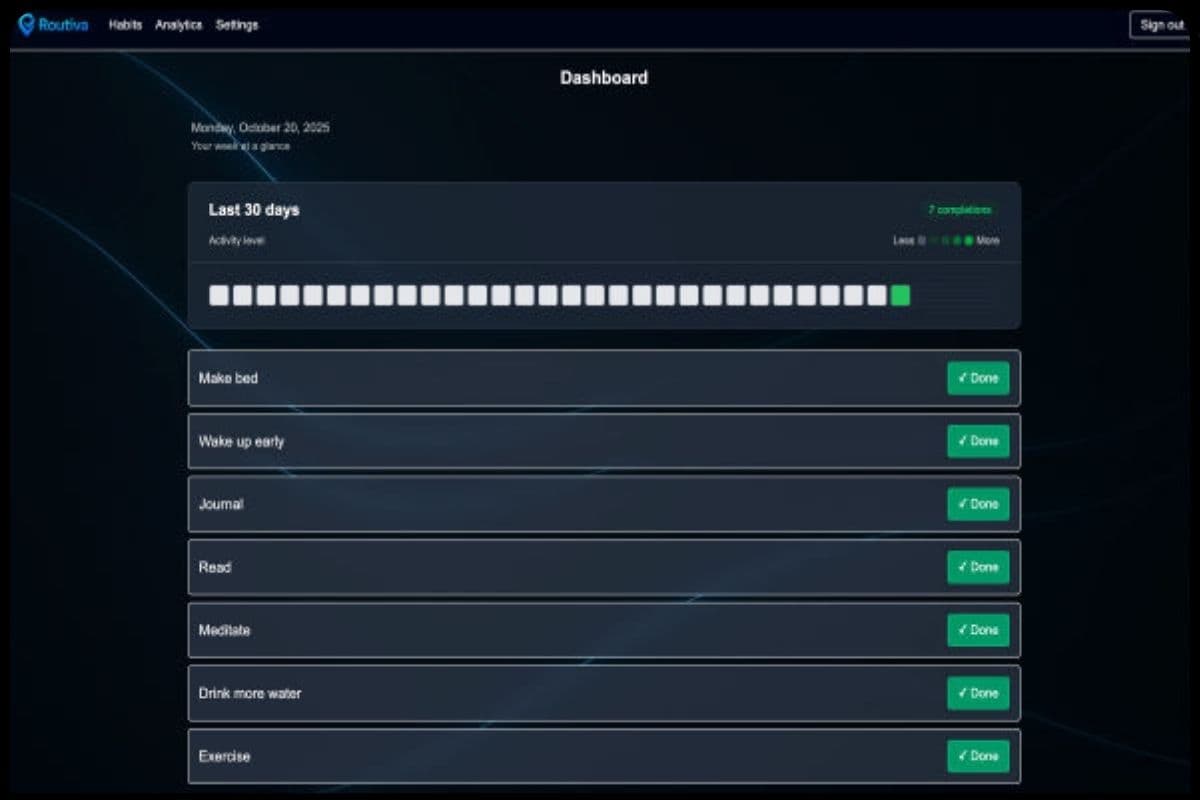
Routiva
A privacy-first habit tracker built on Next.js 15, with 16 SSR-safe color themes, server-rendered activity heatmaps, streak analytics, and per-user cron reminders.
- 16 color themes (light and dark) with SSR-safe hydration guard
- Server-rendered activity heatmaps and per-habit streak analytics
- Timezone-aware per-user cron reminders with configurable daily timing
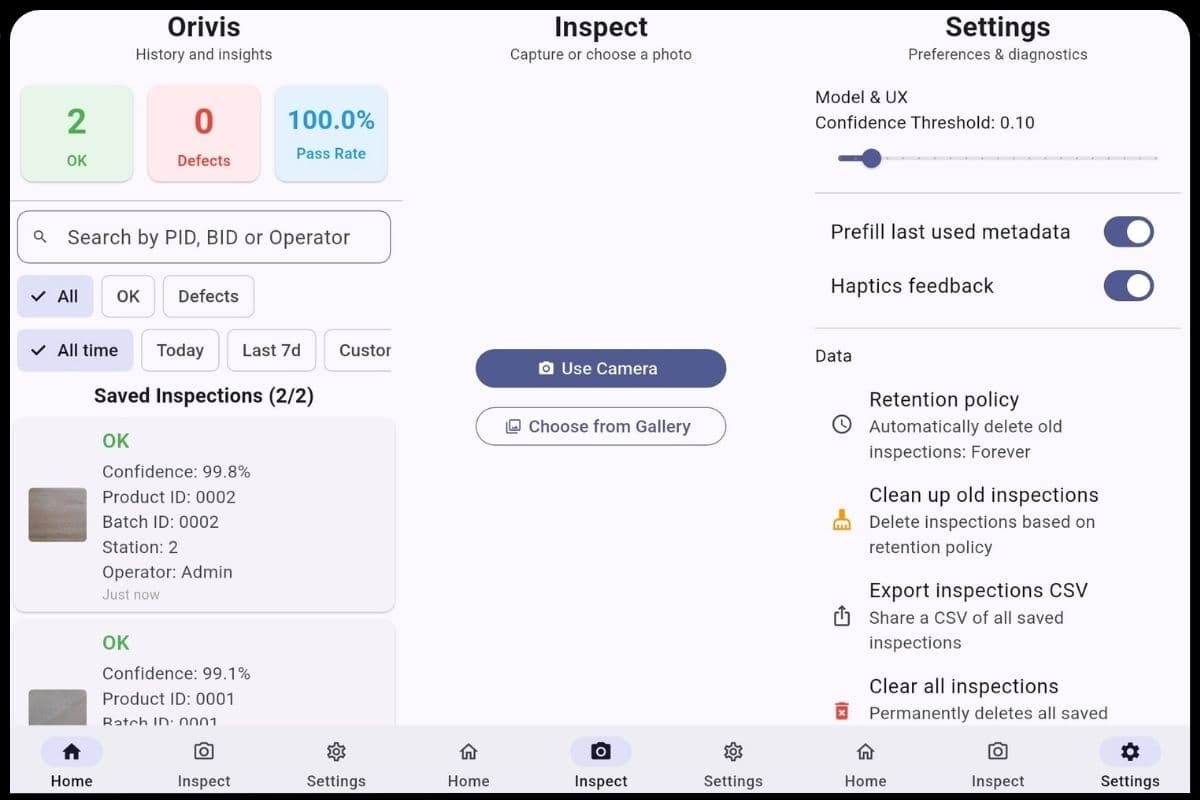
Orivis
A privacy-first mobile defect classifier running a quantized MobileNetV3 model fully on-device, with dual-write corruption recovery and a built-in preprocessing diagnostic tool.
- Quantized MobileNetV3 with on-device INT8 inference
- Dual-write backup with automatic corruption recovery
- Built-in diagnostic screen running 4 normalization schemes in parallel
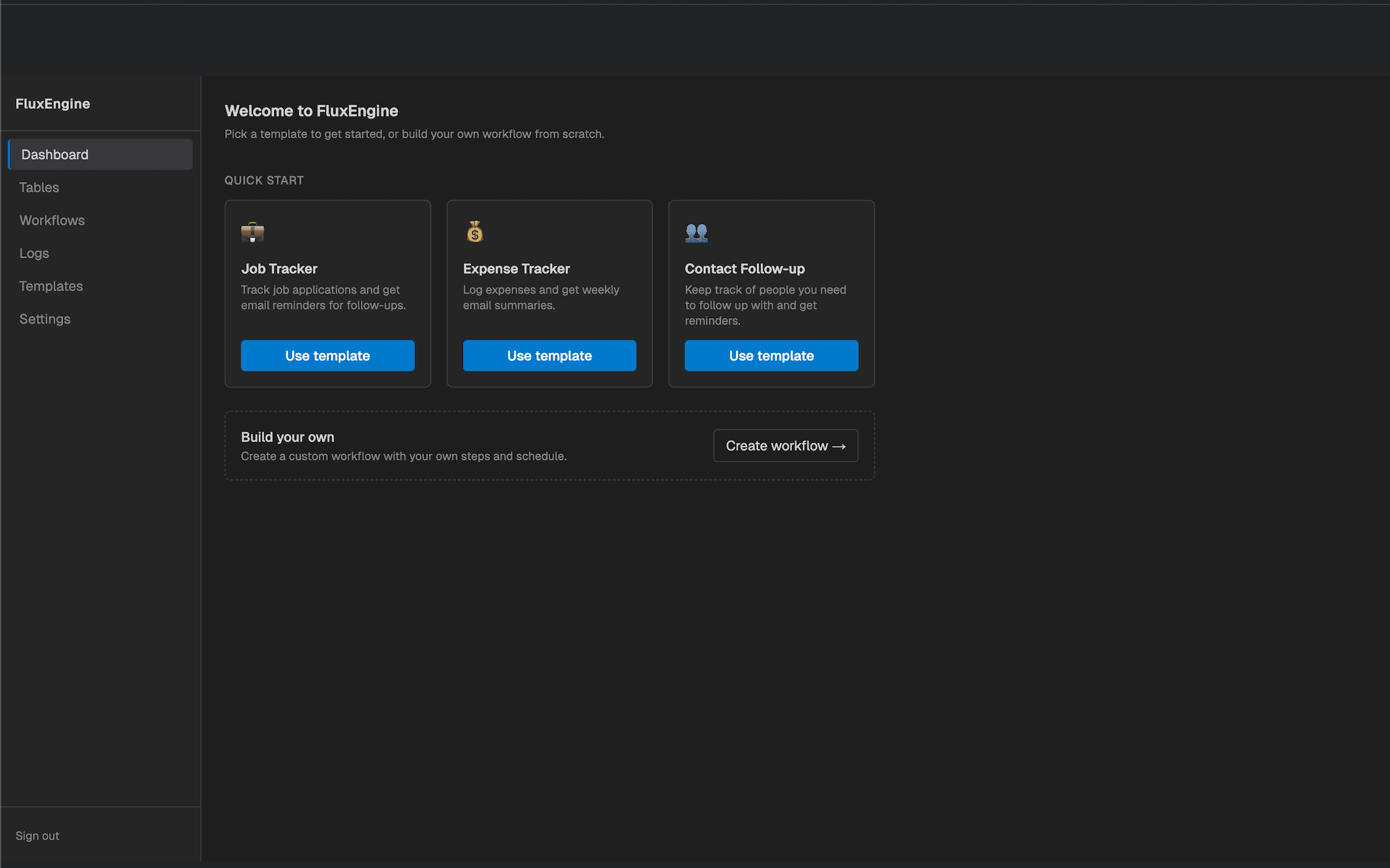
FluxEngine
A self-contained workflow automation engine - define pipelines as ordered steps, store data directly in the system, and run them on a cron schedule with no external infrastructure.
- Sequential pipeline engine with per-step execution context
- Embedded DuckDB with zero external dependencies
- In-process APScheduler with DB-backed persistence across restarts
Project Blogs
Routiva - Blog
Features, tech stack, and development journey.
What is Routiva?
Routiva is a habit tracking app. You add habits, check them off each day, and watch your streaks and activity heatmap build over time. You can organize habits into color-coded groups with emoji icons to keep things from getting cluttered as your list grows. The whole thing is free, has no ads, and does not sell your data.
What problem does it solve?
Building habits is hard when you have no sense of how consistent you actually are. Most people guess at their own patterns and underestimate how often they slip. Routiva makes consistency visible: a 30-day heatmap and a live streak counter give you a concrete record instead of a vague feeling. The milestone confetti at 7, 30, 100, 365 days adds just enough positive reinforcement to make streaks feel worth protecting.
Tech stack
Next.js 15 (App Router), TypeScript, Tailwind CSS, Prisma ORM, PostgreSQL, NextAuth.js with email magic links via Resend SMTP. Sessions use JWT, expire after 30 days, and are stored in httpOnly cookies. Theme preferences are persisted to the database and synced via /api/user/preferences. Deployed on Vercel.
Themes
Users pick a color mode (light, dark, or system) and one of 16 pastel primary colors, which combine with light/dark mode to produce 32 rendered theme variants total. Both settings are stored on the User record in the database and synced on change via a PATCH to /api/user/preferences. On the client, a ThemeProvider reads those preferences and injects a set of CSS custom properties that cover backgrounds, borders, button states, and text colors, with separate values for light and dark mode. The provider also watches the prefers-color-scheme media query so system mode users get live updates when their OS switches. Children are not rendered until after mount to prevent hydration mismatches. Users can also choose from four background patterns (solid, mesh, dots, grid) - that preference lives in localStorage because it is display-only and does not need to sync across devices.
How streaks and heatmaps work
Every habit completion writes a HabitLog row with a habitId, a status (done or skipped), and a date normalized to UTC midnight. Normalizing to UTC midnight is important: if you store a raw local timestamp, a habit logged at 11:59 PM in one timezone can shift to the next day on the server and break streak math. The (habitId, date) pair has a unique constraint, so the completion endpoint does an upsert rather than a blind insert. The current streak is computed by walking backwards from today and counting consecutive days with a done log, stopping at the first gap. Milestones at 7, 14, 21, 30, 60, 90, 100, 200, 300, and 365 days fire confetti animations using canvas-confetti, escalating from a simple burst at 7 days to a full fireworks effect at 365. The heatmap is a groupBy query on HabitLog for the past 30 days, mapped to a grid of colored cells where opacity scales with the number of completions that day.
How groups work
A HabitGroup has a name, a color (one of 16 options), an optional emoji icon, and a sort order. Habits have an optional groupId foreign key pointing to a group. If you delete a group, the foreign key is set to null so habits are not deleted along with it. You manage groups through a modal with a color picker and an emoji picker. On the dashboard, you can filter the habit list by group, and each group displays a badge showing how many habits belong to it. The order field is there to support drag-and-drop reordering if that gets built out.
Key engineering decisions
UTC midnight normalization for dates - the most consequential decision because it affects correctness of the core feature (streaks). Storing raw timestamps or local date strings causes off-by-one errors at timezone boundaries, so everything gets normalized on write. Composite unique constraint on (habitId, date) turns the log endpoint into a simple upsert and eliminates a whole class of duplicate-entry bugs. Database indexes on (userId, isArchived) and (habitId, date) keep the dashboard and streak queries fast as data grows. Rate limiting on all mutation endpoints and Zod validation on all API inputs. Wallpaper preference kept in localStorage - cosmetic only, no need to round-trip to the server.
Hardest technical challenge
Getting date math right for streaks. The surface looks simple but the edge cases add up: what counts as "today" depends on the user’s timezone, streaks should not reset because of a timezone boundary crossing, and you need to handle the case where someone logs a habit at midnight in a way that is unambiguous. The solution was to commit fully to UTC midnight as the canonical date representation. The server normalizes every incoming date immediately, and all comparisons happen in UTC. This is a deliberate tradeoff: a user’s "day" is defined in UTC rather than their local time, which is wrong in edge cases but correct for the vast majority of real-world usage and avoids a much more complex per-user timezone system.
What I’d do differently
Finish the reminder system before shipping UI polish. The daily email reminders and weekly summaries are fully modeled in the schema and the cron routes exist, but they never got completed. Reminders are one of the highest-leverage features for a habit app because they are what actually prompt someone to open it. I spent time on things like background patterns instead of finishing what would have driven retention. Plan the analytics module as a shared library from the start - the streak computation logic ended up duplicated between API handlers and client components. Store the wallpaper preference in the database so it syncs across devices.
Orivis - Blog
Features, tech stack, and development journey.
What is Orivis?
Orivis is an on-device visual quality inspection app for manufacturing and production environments. It uses a TFLite model running entirely on the device to classify surface defects in real time from photos taken with the phone camera, and logs every inspection with metadata (product ID, batch, station, operator) for audit and traceability.
What problem does it solve?
Manual visual inspection on a production line is slow, inconsistent across operators, and hard to audit. A cloud-based solution adds latency, requires reliable network access, and raises data privacy concerns in many factory environments. Orivis puts instant, consistent defect classification directly on the inspector’s phone with no network dependency, and structures the output into searchable, exportable records.
Tech stack
Flutter (Dart) for the mobile app (iOS and Android). TensorFlow Lite with a quantized MobileNetV3 model (4.3 MB) for on-device inference. SharedPreferences for primary storage with a JSON backup file for corruption recovery. Python and Keras for model training with INT8 quantization via TFLite conversion.
Model
Five classes, one per defect type plus a clean-pass category: OK (no defect), Scratch (surface scratches), Crack (fractures or cracks), Dent/Deformation (physical deformations or shape irregularities), and Stain/Discoloration (staining or color anomalies). Input is a 224x224 RGB image. The model outputs a five-element logit vector; softmax is applied in the inference service to convert it to a probability distribution.
How the model was built
MobileNetV3 was fine-tuned from ImageNet pretrained weights using TensorFlow. Training data is organized as one folder per class under a root directory. The preprocessing pipeline resizes images to 224x224 and feeds raw pixel values in [0, 255] with no normalization, which matches the inference path. After training, the model is converted to TFLite with INT8 quantization using a representative dataset of 200 training samples to calibrate the quantization ranges. There are two training scripts in the repo - one using TFLite Model Maker and one using native Keras with configurable augmentation (random flip, rotation, zoom, brightness, contrast), early stopping, and learning rate reduction on plateau. The Keras path produced the deployed model.
How corruption recovery works
Every write to SharedPreferences is preceded by a write to a JSON backup file in the app support directory (inspections_backup.json). The backup is flushed to disk before the preferences write completes, so the file is always at least as recent as the primary store. On read, the data service decodes the JSON from SharedPreferences. If that decode throws (malformed bytes, truncated data), the service catches the error, reads the backup file, parses it, restores the result to SharedPreferences, and returns the recovered data. If the backup file is also unreadable, the service logs the failure and returns an empty list rather than crashing. Every save, update, and delete operation also rewrites the backup, keeping it current.
Key engineering decisions
On-device inference eliminates network latency, works on factory floors with poor connectivity, and keeps inspection images off external servers. Raw [0, 255] pixel input matches the training pipeline - a diagnostic screen in the app tests all four common preprocessing schemes to confirm the match and catch regressions if the model is retrained. Dual-layer persistence (SharedPreferences + backup file) gives a durable fallback without adding a database dependency. Automatic retention policy at startup keeps things simple with no background process required. No external services - no analytics SDK, no crash reporter, no cloud sync.
Hardest technical challenge
The preprocessing mismatch between training and inference. The model was producing high-confidence "OK" predictions on images with obvious cracks and scratches. The failure mode is silent: confidence is high, the prediction is wrong, and there is no runtime error to catch. Diagnosing it required understanding both the training pipeline and the TFLite quantization path, then building a dedicated diagnostic service that runs the same image through four different preprocessing schemes simultaneously and surfaces the probability distributions side by side. That tool confirmed that raw [0, 255] input was the correct path for this model.
What I’d do differently
Embed preprocessing metadata in the model - storing the expected input normalization directly in the TFLite metadata would turn a silent failure into a startup crash. Per-class confidence thresholds - cracks are higher-stakes than stains and should require a higher confidence score. Unified training script - two scripts with different architectures creates ambiguity about which to use for future retraining. Image garbage collection tied to retention - the retention policy prunes database records but does not clean up image files on disk. OTA model updates - the model is baked into the binary, so improving it requires an app release.
FluxEngine - Blog
Features, tech stack, and development journey.
What is FluxEngine?
FluxEngine is a workflow automation engine for defining, executing, and scheduling multi-step data pipelines through a REST API. It ships with an embedded DuckDB database and an in-process scheduler, so there is no external infrastructure to stand up. A Next.js frontend provides a dashboard for managing workflows, tables, schedules, and execution history.
What problem does it solve?
Full orchestration platforms like Airflow or Prefect require external message brokers, dedicated workers, and substantial ops overhead just to get started. FluxEngine is a self-contained alternative where a single Python process handles the API, storage, and scheduling. It targets developers and small teams who need reliable pipeline automation without the complexity of a distributed system.
Tech stack
FastAPI (Python) for the REST API, DuckDB for embedded analytical storage, APScheduler (BackgroundScheduler) for cron-based scheduling, PyJWT + bcrypt for authentication, SlowAPI for rate limiting, SendGrid HTTP API for email delivery, Next.js (TypeScript) for the frontend dashboard, and Docker/docker-compose for containerized deployment.
Architecture
The backend uses a strict three-layer design: routes handle HTTP, validation, and auth enforcement; services contain all business logic; DuckDBService is the single data-access layer for all reads and writes. Pydantic schemas define API contracts; domain models define internal types. On startup, a FastAPI lifespan handler runs DDL migrations against DuckDB, then starts an APScheduler BackgroundScheduler. The scheduler queries the database for all enabled cron schedules and registers them as in-process jobs using CronTrigger. The frontend is a separate Next.js app that communicates with the API over HTTP.
Execution
ExecutionService.run_workflow iterates a workflow's steps in sequential order. Each step receives the output of the previous step as a list of row dictionaries (the "context"). Step types: query reads rows from a managed DuckDB table with optional column filters; transform projects columns and filters rows entirely in Python; condition filters rows on a single column/operator/value pair; action POSTs rows to a webhook URL, sends a push notification via ntfy.sh, or sends a formatted email via SendGrid. The pipeline halts on the first step failure. After the run, a summary (row counts, success/failure per step, final row count) is written to the executions table; the actual row data is discarded.
Scheduling
Each workflow can have one schedule stored in the schedules table with a cron expression and timezone. On startup, all enabled schedules are loaded and registered with APScheduler using CronTrigger.from_crontab. When a job fires, _run_scheduled_workflow executes the workflow, persists the execution record, and stamps last_run_at and next_run_at back to the schedule row. Schedules can be created, updated, enabled/disabled, or deleted at runtime via the REST API without restarting the server.
Authentication & security
Users register with email and password; bcrypt hashes are stored in DuckDB. Login returns a signed JWT (HS256) containing the user's ID, email, and role. The token is stored in localStorage on the client and sent as a Bearer token on each subsequent request. FastAPI dependency injection validates the token and enforces RBAC (admin vs. editor) at the route level. Additional hardening: HTTP security response headers (X-Content-Type-Options, X-Frame-Options, X-XSS-Protection, Referrer-Policy), SlowAPI rate limiting, and CORS restricted to configured origins.
Key engineering decisions
DuckDB as the storage layer eliminates any external database dependency for development and MVP deployment. The tradeoff is DuckDB's single-writer constraint and known ART index bugs in v0.10.0, both documented in the codebase. APScheduler BackgroundScheduler runs inside the FastAPI process requiring zero additional infrastructure, with the tradeoff that in-flight jobs are lost on process restart. Sequential step pipeline with pass-through context makes execution simple and predictable. Service layer separation keeps routes thin and logic independently testable. Soft deletes (is_active flag) on workflows, tables, steps, and templates preserve audit trails.
Hardest technical challenge
DuckDB v0.10.0's ART index bug. Any UPDATE on a column covered by an ART index triggered a spurious "Duplicate key" PK violation. This hit idx_workflows_status (needed for filtering by status) and idx_tables_name_unique (needed for unique name enforcement). Both indexes had to be dropped entirely and uniqueness moved to the service layer. A related issue: using CURRENT_TIMESTAMP in a SET clause caused DuckDB to re-evaluate sequence defaults on the same row, producing the same false violation. Resolved by binding timestamps as parameters instead of using SQL expressions.
What I'd do differently
PostgreSQL over DuckDB - the ART index bug and single-writer constraint make DuckDB fragile under real load. Celery + Redis for scheduling - in-process APScheduler has no durability guarantees. DAG-based execution engine - sequential pipelines are a subset of DAGs, and designing for DAGs from the start would make the abstraction strictly more powerful. Explicit execution state machine with pending/running/succeeded/failed/retrying states - currently there is no in-flight state. httpOnly cookies for auth instead of localStorage to eliminate the XSS attack surface. Event sourcing for step execution - store each step's output as an event rather than discarding it after the run.
What this project taught me
Embedded databases behave differently from client-server databases under write load. DuckDB's single-writer model and ART index bugs only became visible once real UPDATE workloads ran against indexed columns. Integration tests catch what unit tests miss - a mock-based test suite would have passed while the ART bug silently broke production updates. FastAPI's dependency injection system makes layered auth clean and easy to test in isolation. In-process scheduling is fast to wire up but lacks durability - that tradeoff becomes obvious the moment you think about what happens to an in-flight job during a deploy. Storing JWTs in localStorage exposes them to XSS; the better default is httpOnly cookies, which are inaccessible to JavaScript entirely.
About Me
Software Engineer who ships full-stack products end to end. I've built a habit tracker with 16 color themes and real-time analytics, an on-device ML inspection app, and this portfolio - all designed, developed, and deployed solo.
I care about clean architecture, fast UIs, and writing code that's easy to change. Outside of code, you'll find me at the gym, watching the markets, or deep in a conversation about cars.
Expertise
Languages
TypeScript
Primary language across production full-stack applications.
JavaScript
Frontend logic and Node.js services.
Python
Backend services and data processing pipelines (FastAPI).
Frontend
React
Component-based UI development.
Next.js
Full-stack framework - SSR, routing, and API routes.
Tailwind CSS
Utility-first styling for responsive UI.
Backend
Node.js
Server-side runtime for APIs and services.
Python / FastAPI
Backend services and data pipeline layers.
REST API Design
Service communication patterns and route design.
Databases
PostgreSQL
Relational database design and production usage.
Prisma
ORM for schema design, migrations, and typed queries.
DevOps / Tools
AWS
Cloud infrastructure for storage and deployment.
Docker
Containerised development and deployment.
Git / GitHub
Version control, collaboration, and CI/CD workflows.
Other
Java
Object-oriented programming and coursework projects.
C++
Systems programming and algorithms coursework.
Communication
Explains ideas clearly in speech and writing, tailors detail to the audience, and documents decisions.
Ownership & Accountability
Takes responsibility end-to-end, surfaces risks early, and follows through after launch.
Problem Decomposition
Breaks ambiguous problems into shippable steps and makes trade-offs explicit.
Collaboration & Teamwork
Works across functions, shares context, and resolves conflicts constructively to move the group forward.
Learning Agility
Quickly absorbs new tools/domains and adapts based on feedback and data.
Time Management & Prioritization
Plans, estimates, and focuses on the highest-impact work first.
Customer/User Empathy
Centers decisions on user value and validates assumptions with real feedback.
Mentorship & Feedback
Raises the team's bar through thoughtful reviews, pairing, and constructive, kind feedback.